Turn Your Salon's Facebook and Instagram Into a Client-Booking Machine - Without Hiring an Expensive Agency
Get 100 ready‑to‑post salon social media graphics, captions, hashtags, and a step‑by‑step posting plan so you can finally stay consistent, look professional, and attract new clients online — even if you hate social media.
Created by a local marketing agency that helps small businesses grow online in Lake County, Ohio
What You Get
100 Done-For-You Salon Posts: Professionally written, ready-to-use captions designed to attract local clients and showcase your services.
Matching Canva Templates: Easy-to-edit, on-brand graphics that pair perfectly with each post so you always look polished and consistent.
Proven Posting Schedule: A simple, step-by-step calendar that tells you exactly what to post and when to stay visible without overthinking it.
100 Custom Template Pack with frames/elements already in place for fresh but quick custom posts
Quick-Start Video Course: Short, beginner-friendly videos that walk you through how to use the kit, post correctly, and get results fast.
AI Caption Mini-Prompt: Plug-and-play prompts you can use with AI to quickly create fresh variations and custom captions in your own voice.
No tech or design stress: No design skills, no paid Canva, no tech headaches - just open, download and post.
If Your Salon's Facebook or Instagram is "Hit or Miss", This is for You
You know you should be posting, but you're busy behind the chair and social media always gets pushed to "later"
You open Facebook and/or Instagram, stare at the blank caption box, and have no idea what to say
Some weeks you post a lot, then disappear for a month -- and it feels like you're starting from scratch every time
You don’t need a $1,000/month agency or a 20‑hour‑a‑week marketing habit. You need a simple system that tells you exactly what to post, when to post it, and gives you ready‑to‑use content that makes your salon look booked‑out and in‑demand.
Meet the Salon Social Kit: 100-Post Edition
A plug‑and‑play social media system built specifically for local hair salons. You’ll get 100 ready‑to‑post graphics, captions, hashtags, and a pre‑built posting plan that covers your next 100 posts — plus templates and prompts to keep going long after that.
No design skills required, no paid Canva, no tech headaches — just open, download, and post
Preview the post style (real examples)
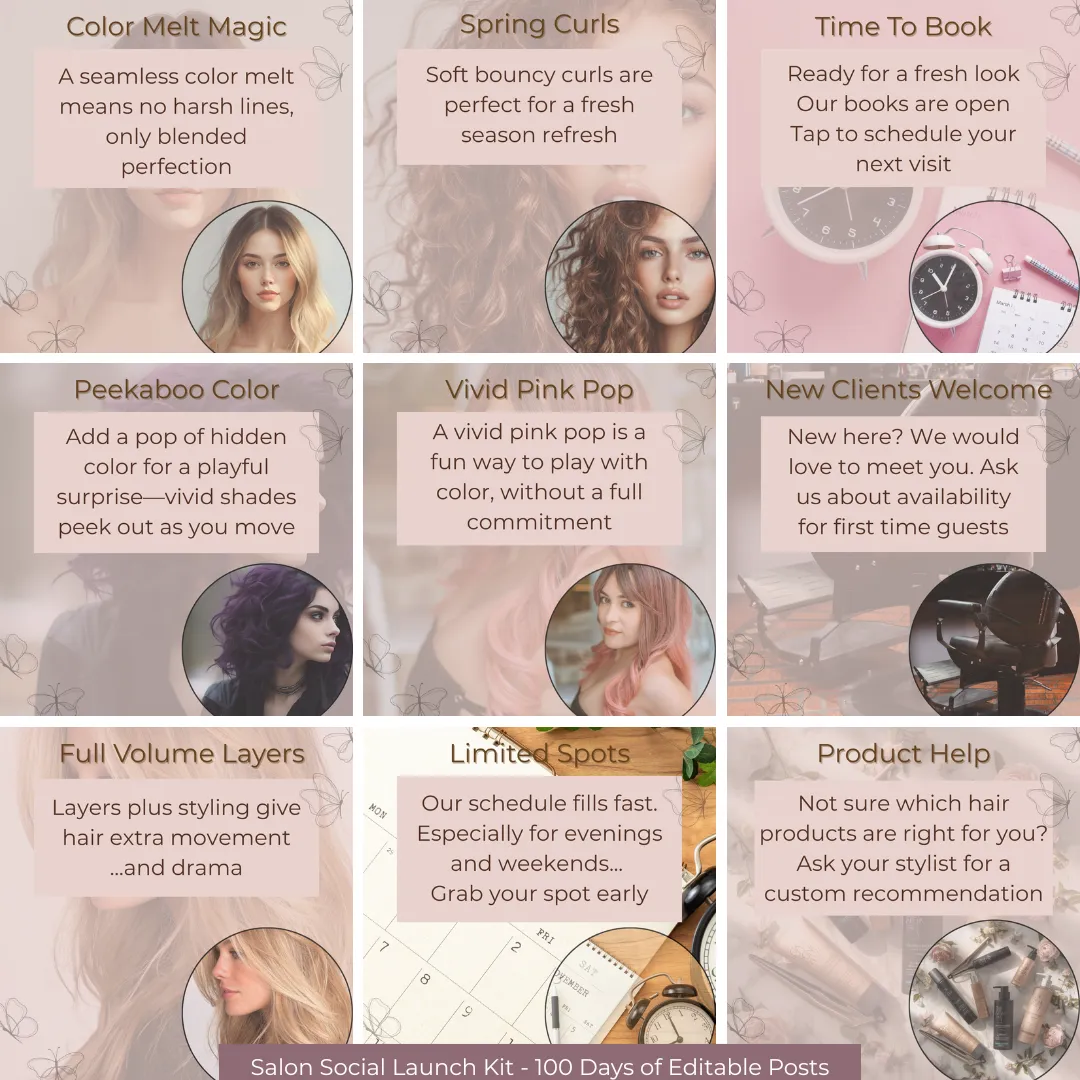
This is what your posts will look like. Your logo can be easily added in Canva in seconds. I'll show you how.
Everything You Need to Look Active, Professional, and Book-Worthy Online
Plug-and-Play Templates
Use this file when you want to use the 100 ready-made posts with headlines and captions. Includes a quick video showing how to post these "as-is" and stay consistent.
Formatted, Customizable Templates
Use this file when you want to create fresh, custom posts using your own ideas. Includes a quick video showing how to customize templates + use the ChatGPT mini-prompt.
Your Reference Guide
The Social Posts Client Page is your posting plan! This turns your Plug-and-Play content list into an easy “what to post next” guide instead of a wall of text.
100 ready‑to‑post social graphics
Designed for salons, post categories: transformations, offers, engagement, education, confidence boosters.
Each post includes a Canva graphic, headline, caption — just download and post.
Proven 100‑post schedule and content list
Spreadsheet and PDF with post IDs, post types, seasonal tags, and the exact order to post.
Long caption & hashtags to add to your post - copy & paste to the text section.
No guessing what to post or when — just follow the plan.
100 customizable Canva templates
Swap in your own photos, update headlines, and keep your feed on‑brand.
Use the same layouts that already work, so you don’t start from scratch.
Mini AI prompt file
Copy‑and‑paste prompts that generate headlines, captions, long captions, hashtags, and image ideas in seconds.
Perfect for extending the life of your kit and creating fresh content fast.
Step‑by‑step video course (+ bonus guides)
Short, beginner‑friendly lessons: how to open and use your templates, follow the 100‑post schedule, and stay consistent.
Bonus: Social Media Success Without the Overwhelm (16 pages) and How a Small Local Business Can Win Online in 2026 (8 pages).
What would it cost to have someone else do all this?
Hiring an agency to plan, design, and write 100 posts: easily $1000 or more
Hiring a freelancer designer + writer: $500-$800+
Doing it yourself: 25-40 hours you don't have
The Salon Social Kit is a one‑time $147 — less than the profit from a few color appointments — for months of consistent, professional content.
Built for real local salons - not influencers
We work with local service businesses, including salons, that need simple, practical marketing — not trends that disappear in a week. This kit comes from real‑world posting, not theory.
Your Bonuses
The Salon Post Generator Mini-Prompt using ChatGPT - Want fresh ideas on demand? You’ll also get our Salon Post Generator Mini-Prompt so you can create 5–10 or even 100 new post ideas anytime you need them (perfect for last-minute openings, new services, special events, or prepping content for next month). Generates headlines + captions + images ideas + 3 hashtags in your salon's voice. You just fill in a few blanks and hit enter.
Bonus Guide #1 - Lesson
“A Complete Guide for Hair Salon Owners Who Want Social Media Success Without the Overwhelm”. This is high end training that almost any salon owner or manager would benefit from.Bonus Guide #2 - Lesson
“How a Small Local Business Can Be Successful Online in 2026”.
FAQ SECTION
Do I need to be good with tech?
No, using this system is actually very easy and we'll guide you through the "how" in the training videos.
Do I have to post every day?
No — post 4–5 times per week for consistency. You’ll have plenty of content.
Can I customize the posts?
Yes. Use them as-is or adjust the headline, caption, hashtags, and image. Or add your salon's logo.
Do I need the paid version of Canva?
No — you do not have to have the paid version of Canva to use & benefit from this product. The paid version will offer you some additional features which can help you but its not required.
Refund policy?
Due to instant digital access, there are no refunds.
Is this only for Facebook?
No you can use Instagram too.